- Docs
- Tutorials
Governance at Every Level
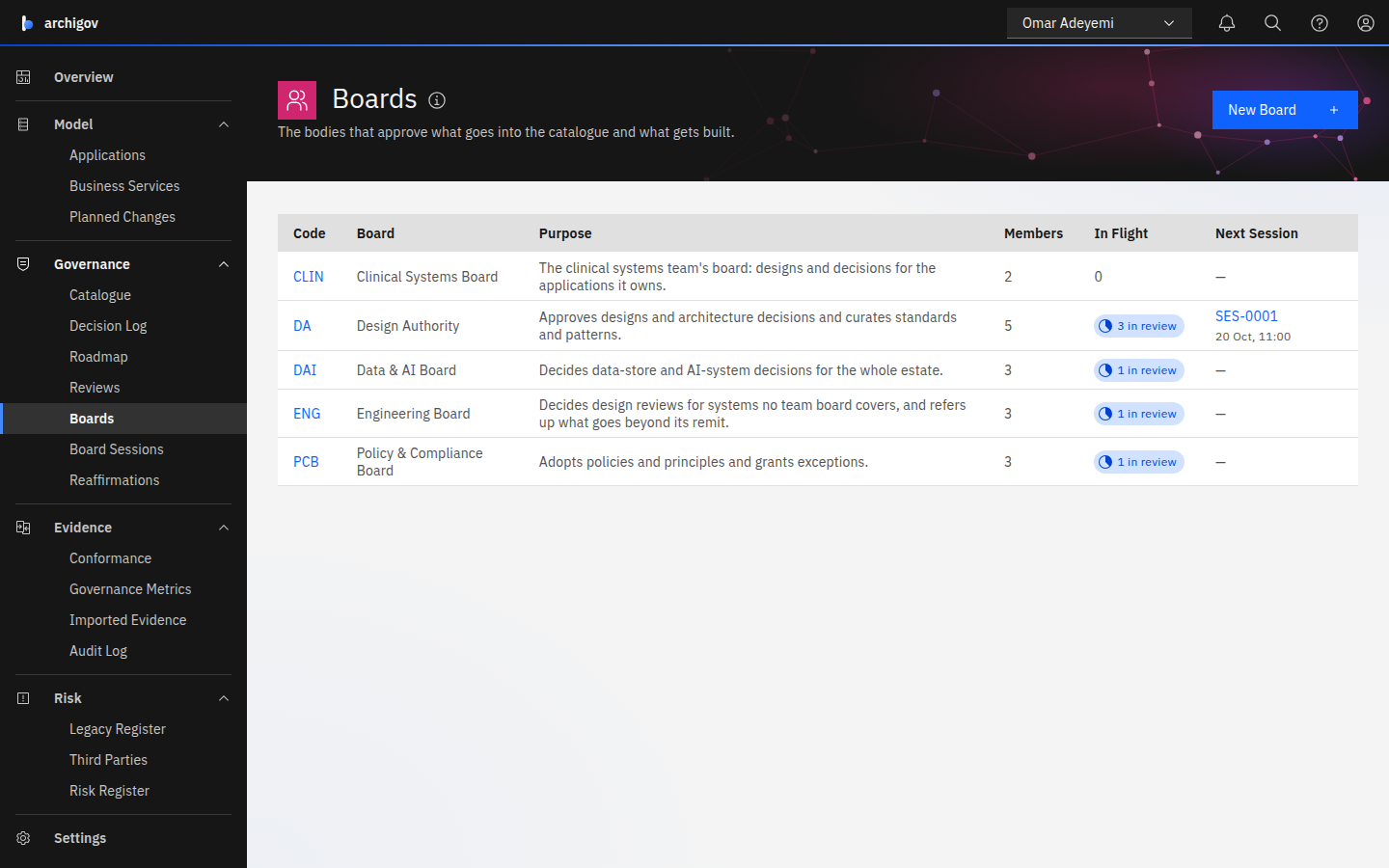
One board decides each review. Boards can sit at four levels — enterprise, domain, delivery and team — and routing sends each review to the right one. Choose the levels your organisation needs.
#One Board Decides Each Review
Every review in Archigov goes to one board, and that board's chair declares the outcome. You choose where boards sit. A small organisation runs everything through its Design Authority. A larger one adds boards at the levels where decisions are actually made, and keeps the Design Authority for what crosses them.
| Level | Example | What it decides | A typical policy | Since |
|---|---|---|---|---|
| Enterprise | Design Authority, Policy & Compliance Board | Everything no other board claims; standards and policies | Positions per area of responsibility; sessions | 0.2 |
| Domain | Data & AI Board | Decisions on its topics; catalogue items in its categories | Positions from its own area owners | 0.2 |
| Delivery | Engineering Board | Design reviews for systems no team board covers | One approval and the fast lane; refers up the rest | 0.2 |
| Team | Clinical Systems Board | Designs, decisions and exceptions for the applications the team owns | One approval and the fast lane | 0.3 |
#How a Review Finds Its Board
When a review is created, routing rules choose its board. Each rule names a review type, and may also name:
- a category: a decision's topic, or a catalogue item's category;
- a kind of catalogue item;
- the applications it covers: those listed, or every application whose resources carry an owner tag.
The most specific matching rule wins. Applications count for more than a kind, and a kind for more than a category. Priority breaks a tie, lowest number first. A review no rule matches goes to the Design Authority.
In the demo, after these tutorials:
| A review for… | Goes to | Because |
|---|---|---|
| A design for Appointments | Clinical Systems Board | Appointments' resources carry the owner tag clinical-systems |
| A data-store decision for PatientFlow | Clinical Systems Board | The team's rule names its applications, which outweighs the Data & AI topic |
| A data-store decision for Data Platform | Data & AI Board | No team claims Data Platform; the topic rule matches |
| A design for Intranet | Engineering Board | No team claims Intranet; the Engineering Board's design rule beats the Design Authority's on priority |
| A hosting decision for Finance ERP | Design Authority | No other rule matches |
| A policy | Policy & Compliance Board | Its rule for the policy type |
The submission form shows where a review will go before you submit it: Will be reviewed by ….
#When Something Belongs Higher Up
A board's chair can refer a review to another board, with a reason. The review moves, the positions recorded so far are superseded, and its areas are derived again for the new board. Referral is how a delivery or team board hands up what goes beyond its remit.
Other groups can contribute to a decision without deciding it:
- areas of responsibility, so each specialist records a position;
- requested assessments, such as a security assessment from the CISO's team;
- dependent decisions, so an item is approved pending another board's decision.
#The Tutorials
- Run your Design Authority: the enterprise level, which the demo already has.
- Add a domain board: data-store and AI decisions go to a Data & AI board.
- Give engineering a board for designs: one approval, the fast lane, and referral up.
- Give each team its own board: routing by application.
Each one works on the demo tenant, so you can follow it on a fresh instance. Creating a board needs the platform admin. Setting its routing needs the board's chair or secretary, or the platform admin.
Something unclear or out of date? Write to hello@archigov.com or open an issue on GitHub.