- Docs
- Guides
Self-Host in Production
Run Archigov for your organisation with Docker Compose — one container, one volume, a health check, secrets in an env file, and TLS at your reverse proxy.
#What You Are Deploying
Archigov is one container image. It runs one Node.js process, keeps all state in one SQLite file under /data, and serves the API and the web UI on one port (8080). There is no database server, cache or queue to run. The same image runs the managed service.
| Requirement | Recommendation |
|---|---|
| CPU and memory | 1 vCPU and 1 GB RAM are ample for a single organisation |
| Storage | A persistent volume for /data; a few hundred MB for a typical estate, plus backups |
| Network | Outbound HTTPS to Azure (management.azure.com, login.microsoftonline.com), Azure DevOps and your AI provider, if used |
| TLS | Terminate at your reverse proxy or load balancer |
#1. Get the Image
Build from source:
git clone https://github.com/00xE8/archigov.git
cd archigov
docker compose -f docker-compose.prod.yml build#2. Configure
Put configuration in an env file next to the compose file — never in the compose file itself:
# .env — keep it out of version control (chmod 600)
APP_BASE_URL=https://archigov.example.org
SEED_DEMO=false
ARCHIGOV_SECRET_KEY=<a long random string from your secret store, e.g. openssl rand -base64 32>

# Sign-in (see the Entra guide)
AUTH_MODE=entra
ENTRA_TENANT_ID=<tenant id>
ENTRA_CLIENT_ID=<application id>
ENTRA_CLIENT_SECRET=<client secret>

# Azure estate (see the Azure guide)
AZURE_TENANT_ID=<tenant id>
AZURE_CLIENT_ID=<application id>
AZURE_CLIENT_SECRET=<client secret>
AZURE_SUBSCRIPTIONS=<sub-id-1>,<sub-id-2>
Uncomment env_file: .env in docker-compose.prod.yml. The full list of variables is in Configuration.
Important
Do not run
AUTH_MODE=localon a network you do not fully trust. Local mode lets any caller choose who they act as; it is a convenience for first runs and evaluation, not a security boundary.
#3. Start
docker compose -f docker-compose.prod.yml up -d
curl -fsS --retry 10 --retry-all-errors http://localhost:8080/api/health
The production example sets restart: unless-stopped and a health check on GET /api/health. On the first boot the database is created and migrated, the two default boards are created, and the instance is empty.
#4. Put It Behind TLS
Proxy https://archigov.example.org to port 8080. Set APP_BASE_URL to the public URL: it is used for sign-in redirects and to mark the session cookie Secure. A minimal Caddy example:
archigov.example.org {
    reverse_proxy localhost:8080
}
Expose /api/hooks/ado publicly only if you use the Azure DevOps service hook.
#5. First Run
- Sign in as a user who holds the
platform_adminapp role. - On Overview, choose Get Started: install the core pack (it imports as adopted), and optionally the other packs as drafts.
- Under Settings → Sources, test and sync Azure, Defender and Azure Policy.
- Under Settings → Users & Access and on each board, seat your chair, decision makers, secretary and reviewers, and assign areas.
- Set the collection interval and home regions under Settings → General.
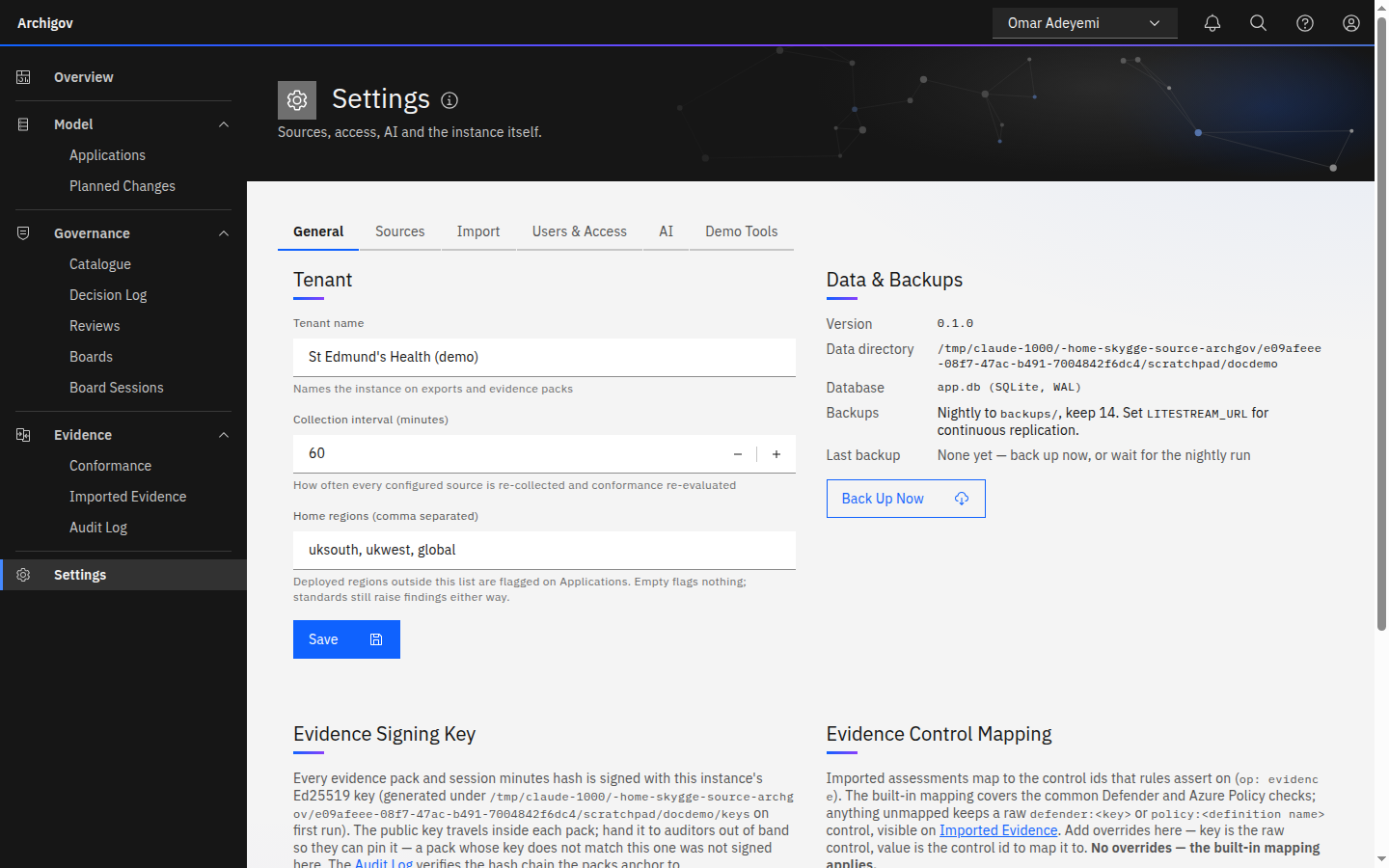
The platform admin can do all of this and still cannot submit, approve or decide anything — seat real people for that.
#Data Directory
| Path | Contents |
|---|---|
/data/app.db | The SQLite database (WAL mode) |
/data/backups/ | Nightly copies (last 14 kept) and a copy taken before each migration |
/data/keys/ | Evidence-signing key pair, session secret, the generated secret key if ARCHIGOV_SECRET_KEY is unset |
/data/evidence-packs/ | Persisted signed evidence packs |
/data/blobs/ | Uploaded files |
Back up the volume, and back up /data/keys separately and securely: without the signing key you cannot sign new packs with the same identity, and without the secret key stored AI provider keys cannot be decrypted. See Backups and upgrades.
#Production Checklist
-
AUTH_MODE=entra, with app roles assigned to real users -
APP_BASE_URLset to the HTTPS URL -
ARCHIGOV_SECRET_KEYset from your secret store - Secrets in an env file or orchestrator secrets, not in compose files
-
/dataon a persistent volume, backed up; Litestream replication if you need point-in-time recovery - Health check wired to your monitoring
- Board seats and areas configured; the platform admin seated on nothing
- Audit chain verified once (
GET /api/audit/verify) and the evidence-signing public key recorded
Something unclear or out of date? Write to hello@archigov.com or open an issue on GitHub.