- Docs
- Guides
Configure AI Providers
Connect OpenAI, Anthropic Claude, Mistral, Ollama or any OpenAI-compatible endpoint, and enable each AI feature separately with its own provider and model.
Everything on this page is optional. With no provider configured, every feature uses its deterministic path. See AI in Archigov for what each feature does and the boundary it keeps.
#1. Add a Provider
As the platform admin, open Settings → AI. Each provider has a card:
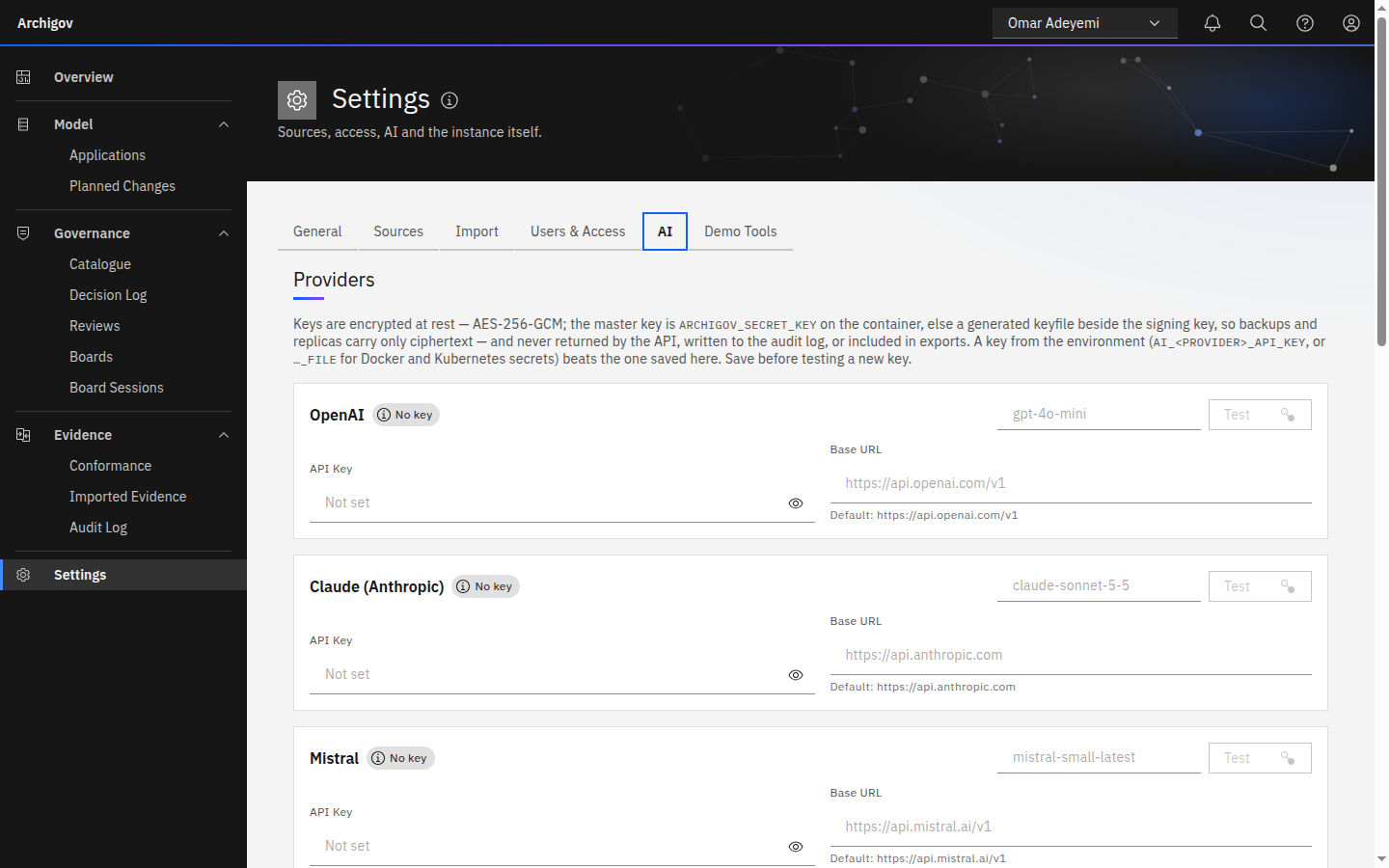
| Provider | API | Key | Default base URL |
|---|---|---|---|
| OpenAI | Chat Completions | Required | https://api.openai.com/v1 |
| Claude (Anthropic) | Messages API | Required | https://api.anthropic.com |
| Mistral | Chat Completions | Required | https://api.mistral.ai/v1 |
| Ollama | Chat Completions | Not needed | http://localhost:11434/v1 |
Change the base URL to use Azure OpenAI, an AI gateway, or another OpenAI-compatible endpoint. Enter a key and choose Test with a model name: Archigov sends one short request and reports success or the provider's error (never the key).
#Keys from the Environment (Recommended in Production)
AI_MISTRAL_API_KEY=<key>
# or, with Docker or Kubernetes secrets:
AI_ANTHROPIC_API_KEY_FILE=/run/secrets/anthropic_key
An environment key beats a stored key; the card shows Key From Environment and the field is disabled. Variables exist for OPENAI, ANTHROPIC, MISTRAL and OLLAMA.
#Keys Stored in Settings
Stored keys are encrypted with AES-256-GCM. The master key is ARCHIGOV_SECRET_KEY if set, otherwise a generated file at DATA_DIR/keys/secret.key that is never included in backups or replicas. Changing the master key makes stored keys unreadable: re-enter them. Leaving the field blank keeps the stored key; saving an empty value clears it.
#2. Enable Features
The What AI Is Enabled For table lists the nine features. For each: switch it on, pick a provider, and enter a model. For example:
| Feature | Provider | Model |
|---|---|---|
| Pre-review | Ollama | llama3.1:8b |
| Decision Review | Claude (Anthropic) | your chosen Claude model |
| Rule Drafting | Mistral | mistral-small-latest |
| Session Notes Drafting | Off | — |
Changes take effect immediately. GET /api/ai/features tells pages which features are on, so buttons appear, or explain why they are disabled.
#The Environment Gateway
Deployments configured before per-feature settings existed can keep using one OpenAI-compatible endpoint for every enabled feature:
LLM_BASE_URL=https://gateway.example.org/v1
LLM_API_KEY=<key>
LLM_MODEL=<model>
A feature the admin explicitly switches off stays off; explicit per-feature settings win over the gateway.
#What Gets Recorded
- AI pre-reviews are stored with
origin: ai,verification: unverified, and the provider and model. Citations that do not resolve are discarded before storage. - Drafts (decisions, rules, references, assessment summaries, session notes, mapping suggestions) are returned to the user and stored only when a human saves them — as that human's content.
- The decision review and the classification suggestion are never stored. A suggestion only fills the Classify form; the author saves the classification with their own reason.
- Settings changes are audited with key material redacted; connection tests are audited as
ai:testwith provider and model.
#Choosing Models
- Pre-review reads the catalogue and the application's resources: its input grows with your estate. A long-context model helps.
- Decision Review is output-heavy (a critique and a rewrite): choose a model that writes carefully.
- Rule Drafting, Control References and Evidence Mapping are short, structured tasks: small models do well.
- To keep data inside your network, use Ollama or an endpoint in your own cloud tenant.
Something unclear or out of date? Write to hello@archigov.com or open an issue on GitHub.