- Docs
- Concepts
Criticality and Business Services
How every application is classified Critical, Important or Standard, which business services and regulated functions depend on it, and the dependency map that follows — derived from tags, confirmed or corrected by a named person.
#Why Classify
Operational-resilience regulations — PRA SS1/21 and FCA SYSC 15A for important business services, DORA for critical or important functions, the NCSC CAF for essential functions — all start from the same question: which systems support the services that must not fail, and what do those systems rest on? A hand-maintained answer drifts from the estate. In Archigov the answer is derived, not authored, like the rest of the derived model: the tags your cloud estate already carries populate it, the method and evidence travel with it, and people spend their effort confirming or correcting it.
Once classified, the rest of governance can use it: rules can target critical applications only, the DORA register fills its criticality column, and the evidence pack records who stands behind each classification.
#What a Classification Is
Every application carries a classification with two parts: how critical it is, and which services depend on it.
| Criticality | Meaning |
|---|---|
| Critical | Supports an important business service, a critical or important function or an essential function, or is tagged as top tier |
| Important | Important to the business, but no regulated service depends on it |
| Standard | Neither critical nor important |
| Unclassified | No tag says how critical it is and nobody has classified it |
| Service kind | Where the term comes from |
|---|---|
| Important business service (IBS) | PRA SS1/21, FCA SYSC 15A |
| Critical or important function (CIF) | DORA |
| Essential function | NCSC CAF / NIS |
| Business service | Not a regulated designation: a service named for mapping only |
The first three are regulated kinds. One invariant holds everywhere: an application that supports a regulated service is critical. Derivation applies it, a person's classification must respect it, and an AI suggestion is corrected to it before anyone sees it.
#Derived from Tags
At the start of every evaluation run, Archigov reads the tags on every application's resources. Tag keys are case-insensitive, and _ and - are interchangeable (business_criticality works).
Tier tags — criticality, business-criticality, tier or service-tier (business-criticality and service-tier also without the hyphen) — map known values to a tier:
| Tier | Recognised values (case-insensitive) |
|---|---|
| Critical | critical, mission-critical, tier-0, tier0, tier-1, tier1, t1, 1, gold, high |
| Important | important, business-important, tier-2, tier2, t2, 2, silver, medium |
| Standard | standard, non-critical, noncritical, tier-3, tier3, t3, 3, bronze, low |
If the application's resources disagree, the highest tier any of them carries wins. A value Archigov does not recognise classifies nothing.
Service tags name the services that depend on the application:
| Tag key | Service kind |
|---|---|
ibs, important-business-service | Important business service |
cif, critical-function, dora-cif, critical-or-important-function | Critical or important function |
essential-function, caf-essential-function | Essential function |
business-service, businessservice | Business service |
One tag can name several services, separated by ;, , or |. A value of true, yes or 1 names nothing: a service tag carries the service's name. For example, resources tagged
criticality      = tier-2
ibs              = Admit and discharge patients
business-service = Clinical reporting; Bed management
make the application Critical — the important business service outweighs the tier-2 tag — supporting one important business service and two business services. In a CSV import, where ; and | already separate tags, separate several services with , and quote the field.
Every derived classification keeps its method (which tag decided it, or that a regulated service did) and its evidence: each resource, tag and value it read. The application page states how it was reached, for example Derived from the criticality tag.
#Confirming or Correcting It
A derived classification starts unverified. Like every element of the model, it carries a verification state:
- Verify — an author stands behind the classification as it is now. If a later collection changes what the tags say (the tier or the services), verification drops back to unverified automatically: whoever verified it stood behind the earlier facts.
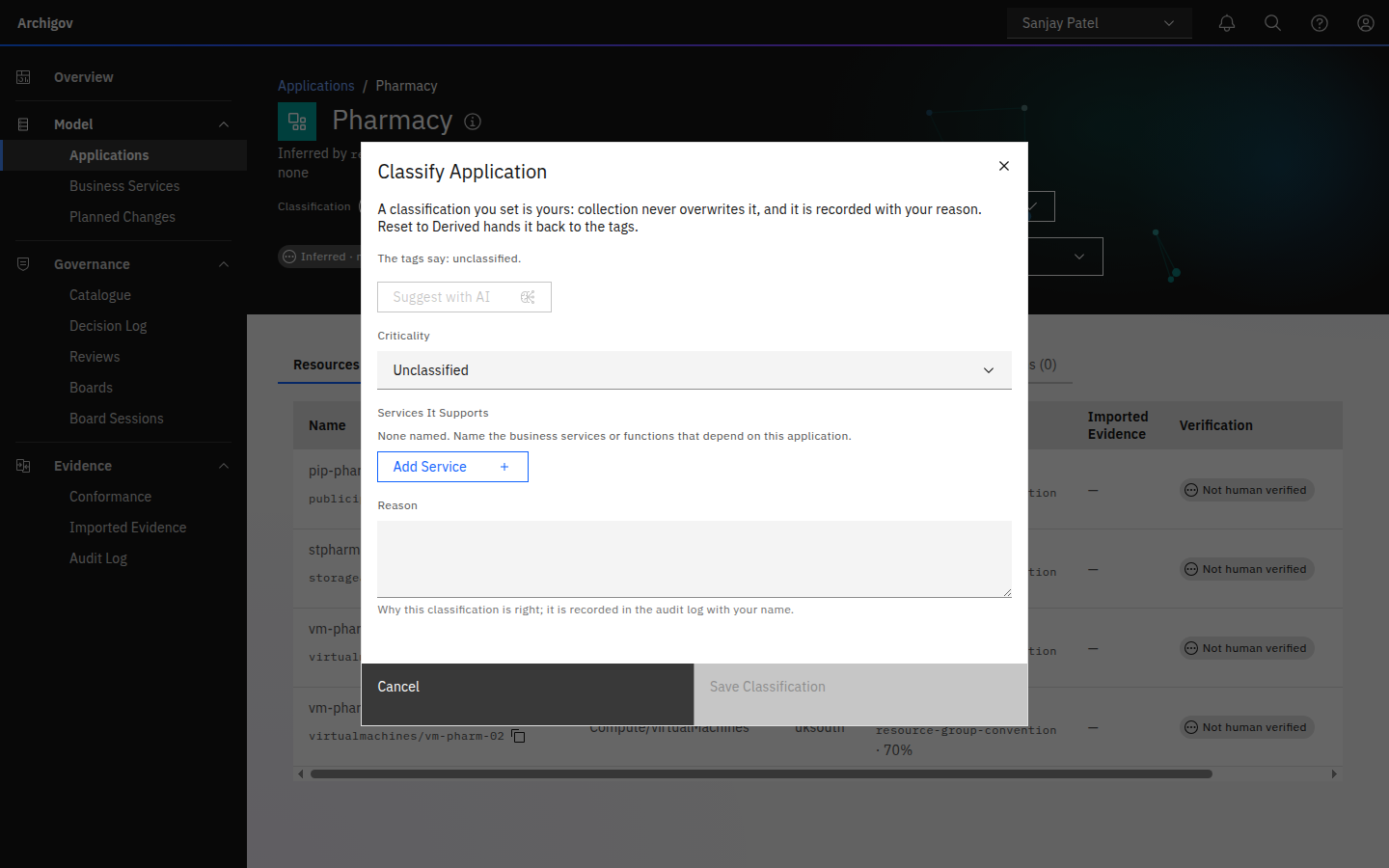
- Classify — an author sets the criticality and the services by hand, with a reason of at least ten characters. The classification becomes theirs: origin
human, verified by them, recorded in the audit log with their name and reason. Collection never overwrites it; what the tags say is still kept beside it and shown in the form. - Reset to Derived — hands the classification back to the tags. Nobody stands behind it until someone verifies it again.
Saving a regulated service with any criticality other than Critical — unclassified included — is refused.
#Who Can Do What
| Who | Can |
|---|---|
Authors (capability verify) | Classify an application, reset it to derived, verify or unverify a derived classification, ask for an AI suggestion |
| Everyone who can read the model — auditors, service accounts, board seats, the platform admin | See classifications, the Business Services page and the DORA register column |
The platform admin, the auditor and a decision maker who holds only a seat (no system role) are refused with 403: a classification is content, and the platform admin's flag is operational only. See Roles and capabilities.
#Where It Is Used
#Rules
A rule sees the owning application's classification under app.*, in match.where at both scopes — a resource rule reads the application the resource belongs to, an application rule reads the application itself:
| Path | Value |
|---|---|
app.criticality | critical, important, standard, or null when unclassified |
app.regulated | true when a regulated service depends on the application |
app.services | The service names, comma-joined |
app.service_kinds | The service kinds (ibs, cif, essential_function, business_service), comma-joined |
Storage accounts behind a critical application must pass Defender's public-access assessment; storage behind other applications is not checked by this rule:
{
  "scope": "resource",
  "match": {
    "type": "Microsoft.Storage/storageAccounts",
    "where": [ { "path": "app.criticality", "op": "eq", "value": "critical" } ]
  },
  "assert": { "op": "evidence", "control": "storage-public-access", "source": "defender", "state": "pass" }
}
Classifications are refreshed from the latest tags at the start of every evaluation run, before any rule reads them. Rules read the stored classification only, never an AI suggestion. An unclassified application has a null criticality, so a rule targeting critical does not reach it — the Business Services page names the unclassified applications so they do not stay that way. See the Rule DSL.
#The DORA Register
The DORA register of information takes B_06.01.0050 (criticality or importance) from the classification: Critical or important for a critical application, Not critical or important for a standard one, and blank for an important or unclassified one. Whether your important tier is a DORA important function is your organisation's call, so Archigov never guesses it. The function name (B_06.01.0030) is the names of the regulated services the application supports, or the application's own name when it supports none.
#The Evidence Pack
The evidence pack carries each application's classification: criticality, services, origin and method, the reason and who set it, and who verified it and when. Every change is in the audit chain as classification:set (from → to, with the reason), classification:reset, classification:verify or classification:unverify.
#The Fast Lane
A design review's fast-lane risk tier is derived partly from its application's criticality: critical makes it high, important or unclassified makes it medium, and only a standard application can leave it low. An unclassified application therefore keeps its designs out of the fast lane until someone classifies it.
#The Business Services Page
Model → Business Services turns the classifications into the dependency map that operational-resilience regulations ask for — derived from the model, never drawn. It opens with counts by tier and how many classifications a human has verified, a notification naming the unclassified applications (Show Unclassified opens them on the Applications page), and a note on any critical application that names no service.
The Service Dependency Map lists every service — regulated kinds first — with the applications behind it, their resources, regions, the shared services they rely on, open findings, and whether every classification behind it is human-verified. Expand a service to see each application's criticality, resources by type, regions, shared services and open findings.
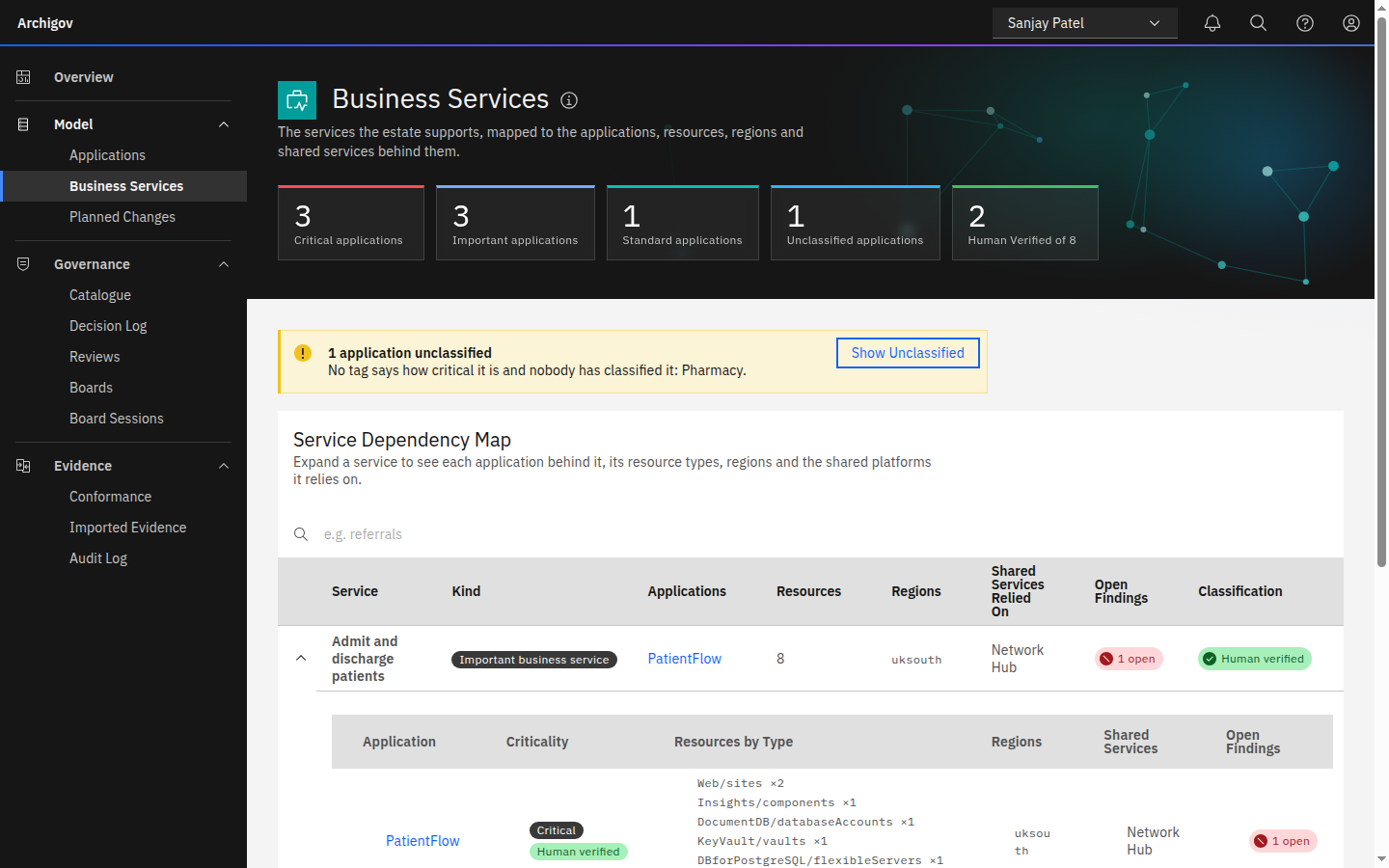
The Applications page carries the same classification in a Criticality column, with a filter for Critical, Important, Standard or Unclassified. Each application's page shows a Classification line under its title: the tier, the services, the origin, the verification state and how it was reached.
#Heuristics and AI
Everything that gates a rule or changes state is deterministic:
- Derivation from tags, with the method and the evidence kept.
- The invariant: a regulated service makes an application critical — in derivation, in a person's classification and in an AI suggestion.
- Verification drops back to unverified when the derived content changes; a person's classification is never overwritten by collection.
- Rules, the DORA register and the Business Services page read the stored classification only.
The optional AI feature, Classification Suggestion, is off by default; the platform admin enables it under Settings → AI (see AI in Archigov). For an application the tags leave open, a model reads its name, resources, tags, decisions and planned changes, plus the service names the estate already uses, and suggests a tier, the services and a short rationale. The suggestion is corrected to the invariant, then shown inside the Classify form beside an Apply Suggestion button. Nothing is stored: the person still saves it with their own reason, as their own classification. With the feature off, Suggest with AI is greyed with the reason.
Note
A classification records your organisation's designation and who stands behind it. Archigov does not decide which of your services are important business services or critical functions, and it never asserts that you meet the regulations that name them: it shows evidence, not assurance.
Something unclear or out of date? Write to hello@archigov.com or open an issue on GitHub.