- Docs
- Concepts
Legacy Register
Every operating system, runtime, database engine and Kubernetes version in the estate against its vendor's support dates, and the yearly legacy assessment each application with legacy components needs — matched from collected facts, never guessed.
#Why a Legacy Register
DORA Art. 8(7) asks for a specific ICT risk assessment of legacy ICT systems every year, and again before and after connecting new technologies. ISO 27001 A.8.8 and NIST SP 800-53 SA-22 ask the same question in other words: what is unsupported, and what have you done about it? A spreadsheet answer drifts from the estate. In Archigov the answer is derived, not authored, like the rest of the derived model:
- the versions come from facts collection already holds;
- the support dates come from a public, versioned dataset (endoflife.date, MIT licence);
- the assessment is a governance record with a named author;
- a rule turns all of this into findings, so the register stays continuous.
#What Is Tracked
Five resource types are lifecycle-tracked. For each, Archigov reads only the facts collection already holds:
| Resource type | Fact read | Products and versions |
|---|---|---|
| Virtual machines | The image sku and offer | Windows Server (year, and R2), Ubuntu (NN.NN), Red Hat Enterprise Linux (major), Debian (major). An image offer of the form sqlYYYY-wsYYYY names both SQL Server and Windows Server |
| App Service | linuxFxVersion; on Windows, a netFrameworkVersion of v5 or later | .NET, Node.js, Python, PHP, and Microsoft Build of OpenJDK for the Java, Tomcat and JBoss EAP stacks |
| PostgreSQL flexible servers | The engine version | PostgreSQL (major) |
| MySQL flexible servers | The engine version | MySQL (major.minor) |
| AKS clusters | kubernetesVersion | Azure Kubernetes Service (major.minor) |
A virtual machine may also carry a software property naming SQL Server and its year, for example from an import; SQL Server is then matched from it.
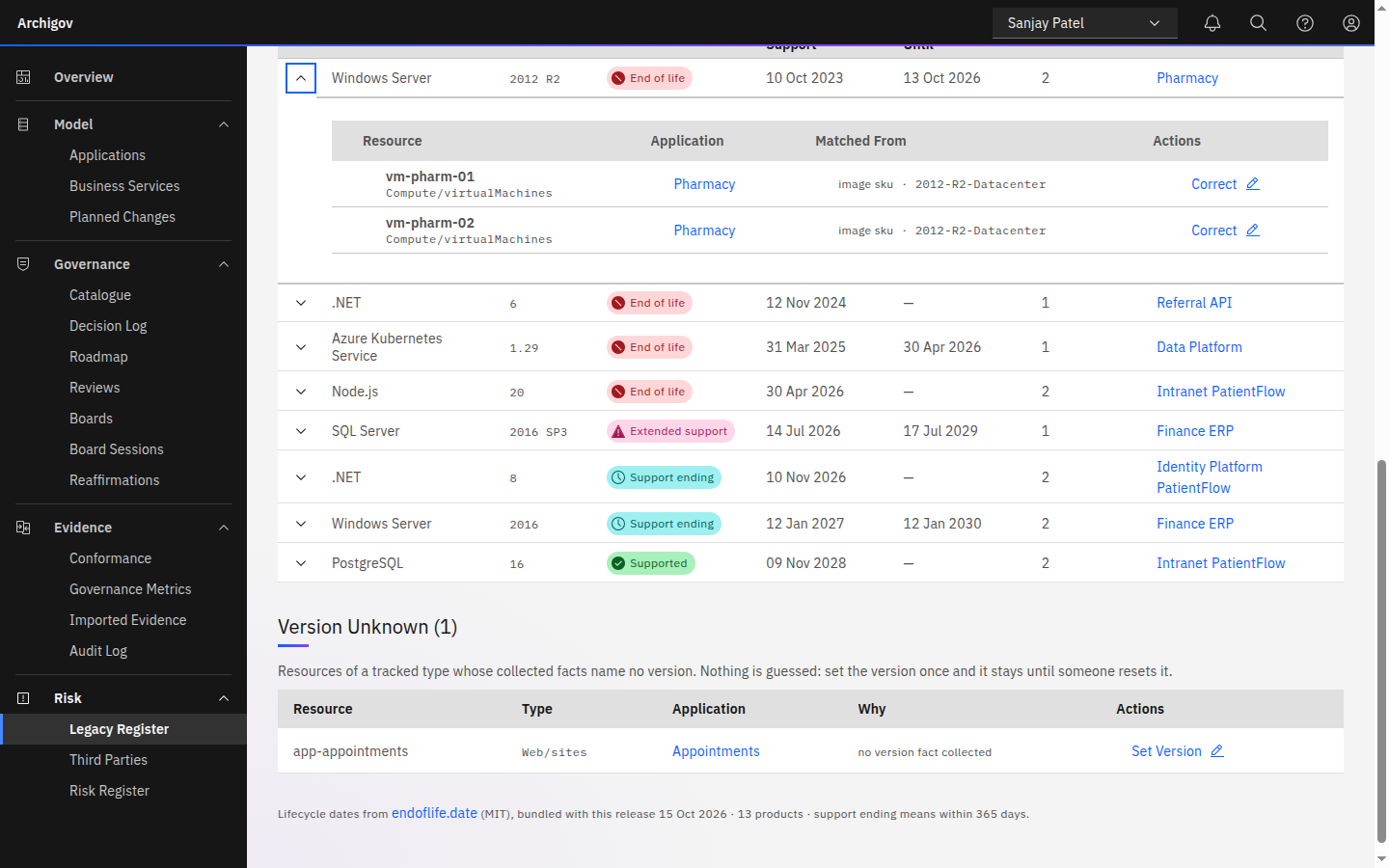
Every match keeps its method and its evidence, for example image sku · 2012-R2-Datacenter, so anyone can see how a version was reached. Two cases say more:
- SQL Server is named by year, and endoflife.date lists each service pack as a separate cycle. Archigov assumes the latest service pack for that year and the method says so: latest service pack assumed.
- PostgreSQL uses the community's dates, and the method notes that Azure may offer extended support beyond them.
#Five States
Each component is in one of five states, worked out from its cycle's dates and today:
| State | Meaning |
|---|---|
| Supported | The vendor still supports this version. A cycle with no published end of support is supported, not unknown |
| Support ending | Support ends within the warning window, 365 days by default |
| Extended support | Past standard support, inside a paid extended-support window that has not yet ended |
| End of life | Past standard support, with no extended support or with extended support over: the vendor no longer issues security fixes |
| Unknown | No version fact was collected, or the version is not in the lifecycle data |
A component in extended support or at end of life is legacy. A resource takes the worst state of its components, and an application the worst state of its resources. Components whose support is ending, in extended support or at end of life also appear on the Roadmap as upgrades, placed by the date support ends.
The warning window and the assessment's validity (below) are instance settings, lifecycle.warn_days (default 365) and lifecycle.assessment_months (default 12). The register states the values in force.
#Unknown Stays Unknown
Archigov does not guess a version from a resource's name or anything else the facts do not say. A tracked resource with no version fact is unknown, and is listed under Version Unknown until a person says otherwise:
- Set Version (on an unknown resource) or Correct (on a matched one) — an author chooses up to five components, each a product and a version from the lifecycle data, with a reason of at least ten characters. The components become theirs: origin
human, recorded in the audit log with their name and reason. Collection never overwrites them. - Reset to Collected Facts — hands the resource back to what collection says, in the same form.
An unknown product or version, more than five components, or a shorter reason is refused.
#The Yearly Legacy Assessment
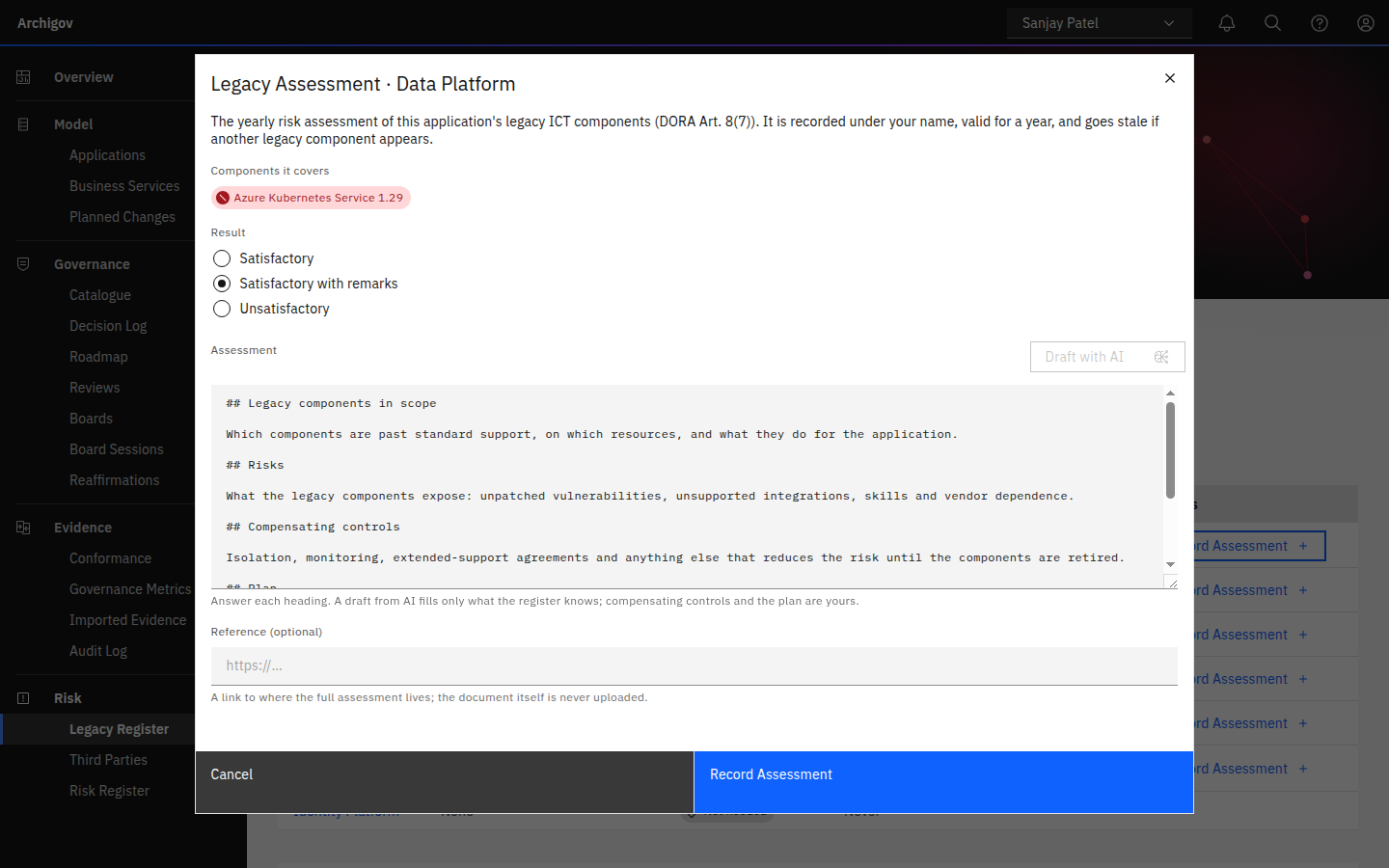
Every application with at least one legacy component needs a legacy assessment: the yearly risk assessment of its legacy ICT components. An author records it under their own name with Record Assessment on the Legacy Register.
- Components it covers — the application's legacy components when it is recorded. They are stored with the assessment.
- Result — Satisfactory, Satisfactory with remarks or Unsatisfactory.
- Assessment — at least ten characters, written under the template's headings: Legacy components in scope, Risks, Compensating controls, Plan and Conclusion. The headings are prompts, never regulation text.
- Reference (optional) — an http or https link to where the full assessment document lives. The document itself is never uploaded.
An assessment is valid for 12 months by default. Each one is a new record; earlier ones stay in the application's history. Every application with lifecycle components has a status:
| Status | When |
|---|---|
| Not needed | The application has no legacy component |
| Due | It has legacy components and no assessment in date |
| Stale | An assessment is in date, but a legacy component it did not cover has appeared since |
| Current | An assessment in date covers every legacy component |
The status says whether an assessment is in date and complete, not whether its result was good. An unsatisfactory assessment is recorded as such and counts as current; what follows is for your boards to decide.
#The Lifecycle Data
Support dates come from endoflife.date, licensed MIT. Each release bundles a snapshot covering the 13 products above, so an instance with no internet access still has dates. The page's footer names the source, the licence, the snapshot's date and the warning window.
The platform admin can Refresh Lifecycle Data to fetch every product again from endoflife.date. A product that fails keeps its previous data, and if every product fails, nothing changes. Refreshing needs outbound HTTPS to endoflife.date. Each refresh is in the audit log as lifecycle:refresh.
#Rules
Two rule operators and a set of paths bring the register into conformance.
lifecycle (resource scope) produces one finding per tracked resource whose worst component is in one of states, by default ["end_of_life"]. Untracked resources are skipped. A resource whose version is unknown produces no finding unless unknown is "finding"; the default is "ignore". Every legacy component on a critical application is a finding:
{
  "scope": "resource",
  "match": { "where": [ { "path": "app.criticality", "op": "eq", "value": "critical" } ] },
  "assert": { "op": "lifecycle", "states": ["extended", "end_of_life"], "unknown": "finding" }
}
lifecycle.* paths are readable in match.where at resource scope: lifecycle.state (the worst state), lifecycle.product, lifecycle.cycle and lifecycle.eol (of the worst component) and lifecycle.tracked. A legacy virtual machine must at least pass Defender's system-updates assessment:
{
  "scope": "resource",
  "match": {
    "type": "Microsoft.Compute/virtualMachines",
    "where": [ { "path": "lifecycle.state", "op": "in", "value": ["extended", "end_of_life"] } ]
  },
  "assert": { "op": "evidence", "control": "system-updates", "source": "defender", "state": "pass" }
}
assessmentCurrent (application scope) produces a finding when the application's assessment is due or stale. kind is required, and legacy is the only kind:
{ "scope": "application", "assert": { "op": "assessmentCurrent", "kind": "legacy" } }A malformed rule of either kind — a state that does not exist, an unknown other than ignore or finding, a missing kind — is refused when it is authored and is a rule error, never a pass. See the Rule DSL.
#The DORA Pack
The dora-ict-architecture pack carries both as standards. Like the rest of the pack, they import as drafts: they are evaluated only once a board adopts them.
| Code | Title | Rule | Control references |
|---|---|---|---|
| STD-DORA-06 | Legacy ICT systems are risk-assessed every year | assessmentCurrent, kind legacy | DORA Art. 8(7) |
| STD-DORA-07 | No ICT component runs past its end of life | lifecycle, states end_of_life | DORA Art. 8(7), ISO 27001 A.8.8, NIST SP 800-53 SA-22 |
STD-DORA-07 counts paid extended support until it ends. To flag extended support too, a board can adopt its own rule with both states. See Governance catalogue.
#The Legacy Register Page
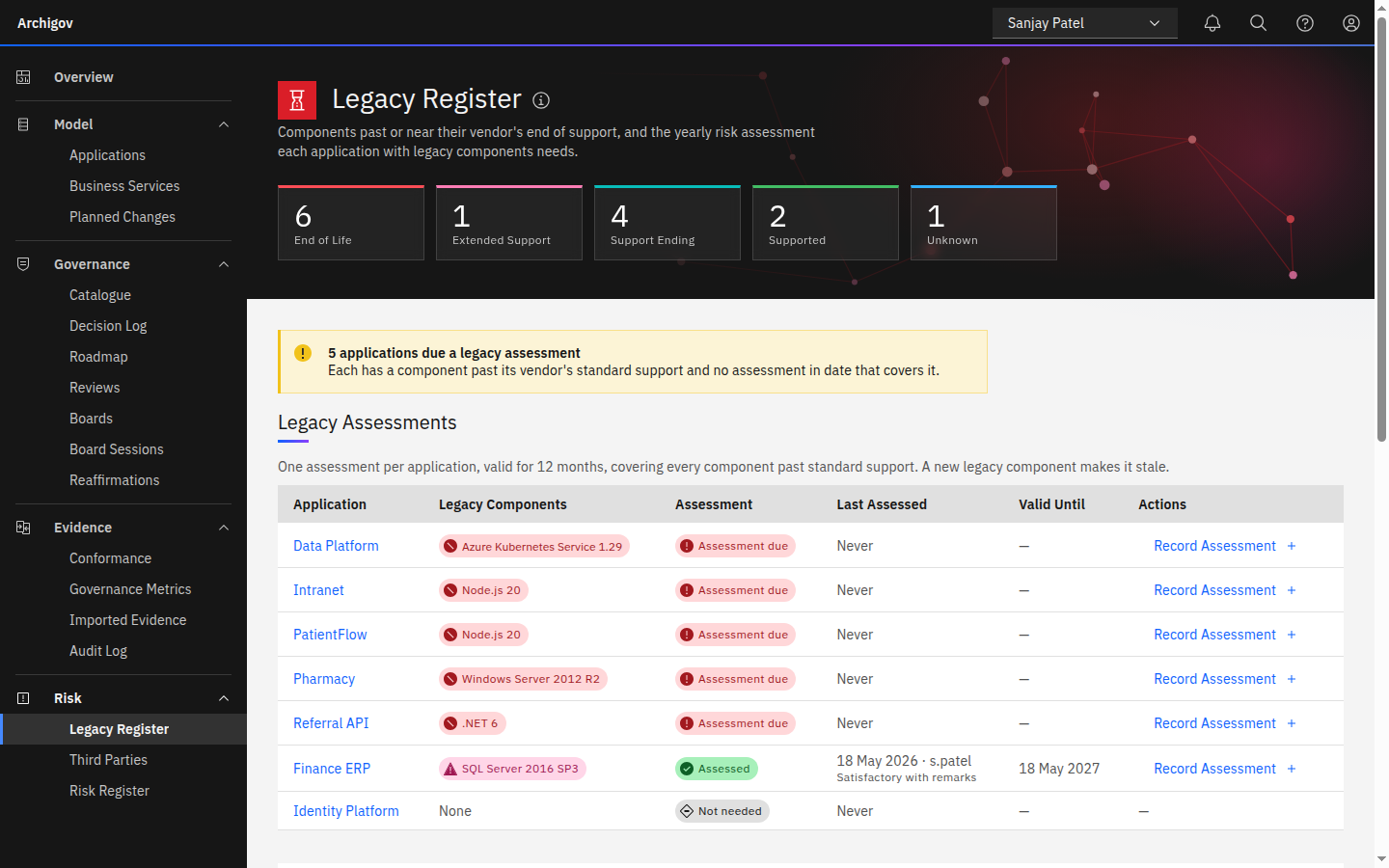
Risk → Legacy Register brings it together:
- Counts by state in the hero band.
- A warning naming how many applications are due or stale.
- Legacy Assessments — one row per application with lifecycle components: its legacy components, its status, when and by whom it was last assessed with the result, until when the assessment is valid, and Record Assessment.
- Components — every version found in the estate, worst first, with its end of support, any extended support and the applications running it. Expand a version for its resources, how each was matched, and Correct.
- Version Unknown — tracked resources whose facts name no version, each with Set Version.
- The footer — the data source, licence and date, with Refresh Lifecycle Data for the platform admin only.
States and statuses are status tags (colour, icon and word) and explain themselves on hover.
#Who Can Do What
| Who | Can |
|---|---|
Authors (capability verify) | Set, correct or reset a resource's components; record a legacy assessment; ask for an AI draft |
Platform admin (manage_platform) | Refresh the lifecycle data |
| Everyone who can read the model — auditors, service accounts, board seats, the platform admin | See the register, the components and every assessment |
The platform admin, the auditor and a board member who holds only a seat (no system role) are refused with 403 on corrections and assessments: both are content, and the platform admin's flag is operational only. An author is refused with 403 on refreshing the lifecycle data. See Roles and capabilities.
#Evidence and Audit
Every change is in the audit chain: lifecycle:set and lifecycle:reset on the resource, with the reason; legacy:assess on the application, with the result, the components covered and the validity; lifecycle:refresh. The evidence pack carries each application's legacy standing: its status, its legacy components, and the latest assessment with its result, who recorded it and when, until when it is valid, its reference and what it covers.
#Heuristics and AI
Everything that decides a state, a status or a finding is deterministic:
- Matching reads only collected facts, keeps the method and the evidence, and never guesses a missing version.
- States come from the lifecycle data's dates and today.
- The assessment's status comes from its validity and the components it covers.
- A person's components are never overwritten by collection.
AI is optional and advisory. Draft with AI in the assessment form uses the existing Assessment Drafting feature, so there is no separate switch; with the feature off, the button is greyed with the reason (see AI in Archigov). The draft fills the template's headings from the register's facts and writes To be confirmed: … where the facts are silent, such as compensating controls, the plan and owners. It never invents controls, plans or dates. Nothing is stored: the author edits it and records the assessment as their own. No AI maps versions or sets states.
#What It Deliberately Does Not Do
- It does not scan hosts or guess versions from names. Unknown stays unknown until a person says otherwise.
- It does not track Azure-managed services with no customer-chosen version, such as Azure SQL Database logical servers.
- It does not store the assessment document. It keeps a link only.
- It does not judge the result. An unsatisfactory assessment is recorded as such, and the board decides what follows.
Note
The register shows which versions run where, against published support dates, and who assessed the risk and when. Archigov never asserts that you meet DORA or any other framework: it shows evidence, not assurance.
Something unclear or out of date? Write to hello@archigov.com or open an issue on GitHub.