- Docs
- Guides
Connect Azure DevOps
Feed epics and features into Archigov as planned changes — by WIQL backfill and a service hook — to flag missing decisions and requirements that changed after approval.
#A Feed, Not a Gate
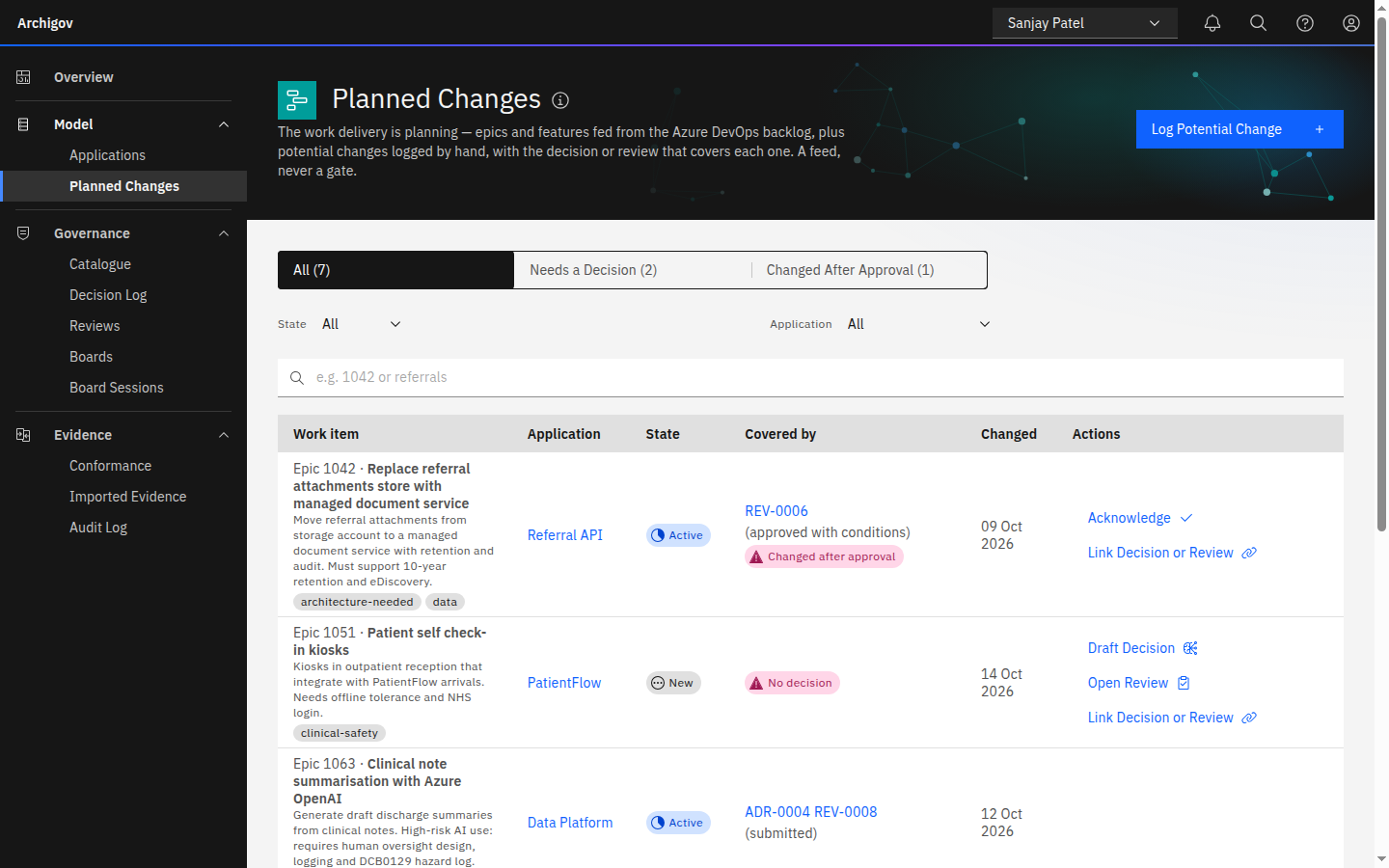
Azure DevOps is a source of planned change, not a workflow Archigov controls. Archigov reads epics and features and tells you two things:
- Needs a decision — an open Epic, Project, Initiative or Change that is linked to no architecture decision and no review.
- Changed after approval — a linked work item whose requirements changed materially after its design was approved.
Nothing in Azure DevOps is blocked or written to. These items appear under Planned Changes, on the Overview pipeline, and in authors' work queues.
#1. Credentials
Either:
- a personal access token with Work Items (Read), in
ADO_PAT; or - an Entra identity (the same
AZURE_*service principal or managed identity) added to the Azure DevOps organisation with read access. WithoutADO_PAT, Archigov requests a token forhttps://app.vssps.visualstudio.com/.default.
Tip
Prefer the Entra identity. It avoids long-lived tokens, and it keeps working as organisations restrict global PATs.
#2. Configure
ADO_ORG=<organisation>
ADO_PROJECT=<project>
ADO_PAT=<token>                 # or rely on the Entra identity
ADO_HOOK_SECRET=<random string> # required for the service hook
ADO_WIQL=                       # optional; see below
The default backfill query reads epics and features that are not removed and changed in the last year:
SELECT [System.Id] FROM WorkItems
WHERE [System.WorkItemType] IN ('Epic','Feature') AND [System.State] <> 'Removed'
  AND [System.ChangedDate] >= @Today - 365
ORDER BY [System.ChangedDate] DESC#3. Backfill
As the platform admin, Settings → Sources → Azure DevOps: Test, then Sync. The backfill runs the WIQL query and fetches items in batches.
#4. Service Hook
For changes as they happen, create a service hook subscription in Azure DevOps (Project settings → Service hooks → Web Hooks):
| Setting | Value |
|---|---|
| Events | Work item created, Work item updated, Work item deleted, Work item restored |
| URL | https://archigov.example.org/api/hooks/ado |
| HTTP headers | x-archigov-hook-secret: <ADO_HOOK_SECRET> |
| Basic authentication | Alternatively, put the secret in the password field |
Calls without the correct secret receive 401. The hook endpoint is exempt from sign-in because it carries its own secret.
#Working with Planned Changes
- Link a work item to an application or a review.
- Draft Decision from a work item: a template, or an AI draft if Decision Drafting is enabled. The author edits and submits.
- Acknowledge a material change once the board has considered it.
- Log by hand: authors can record planned changes no backlog knows yet (
PC-0001). Items from a real source are read-only in Archigov; manual ones can be set to Removed rather than deleted.
Something unclear or out of date? Write to hello@archigov.com or open an issue on GitHub.