- Docs
- Concepts
Boards and Reviews
Typed reviews, routing, approval policies, areas of responsibility, positions, conditionals, declared outcomes and dependent decisions — the explicit workflow by which boards decide.
#The Workflow at a Glance
#Reviews Are Typed
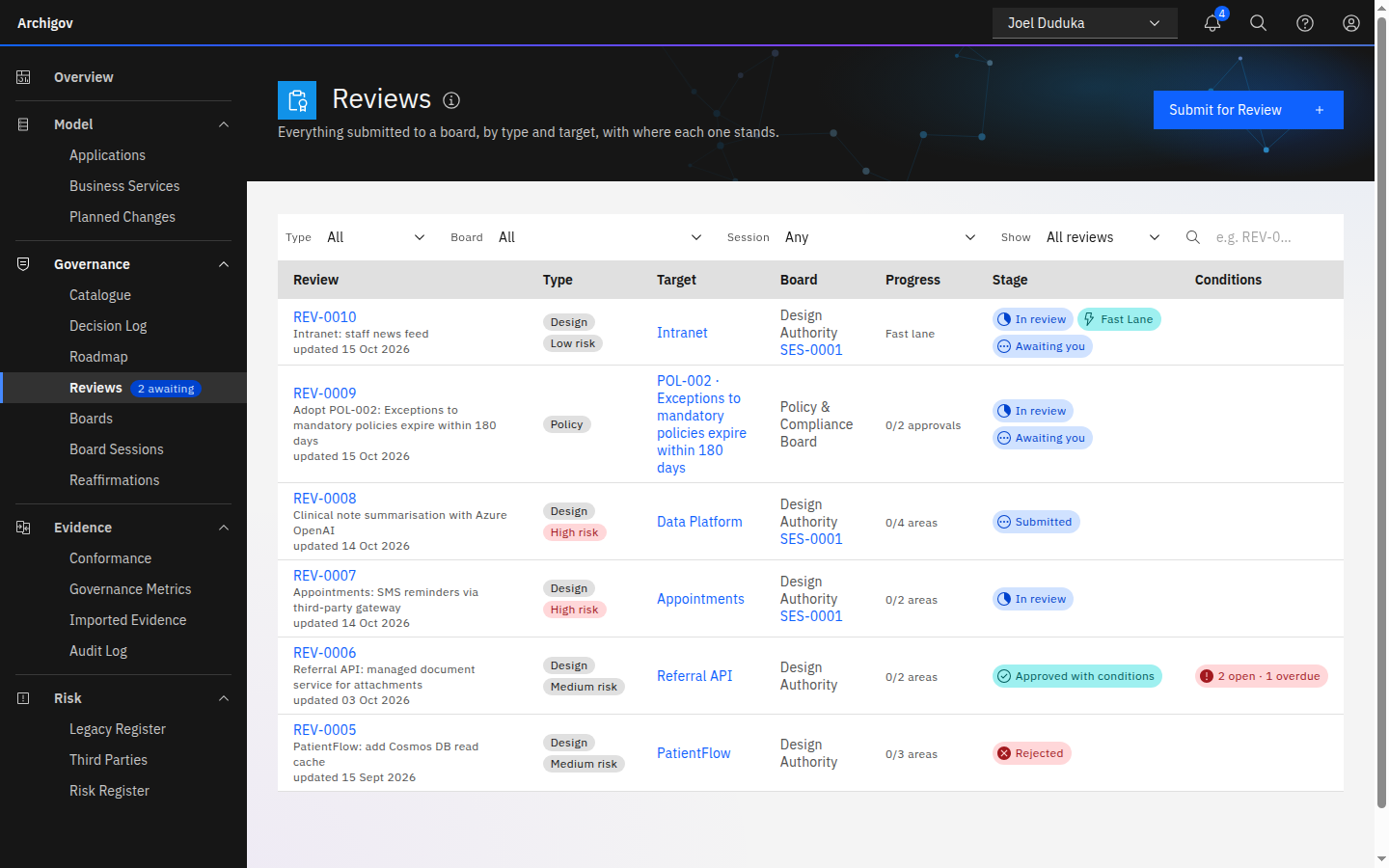
Every governance decision passes through a review (REV-0001). There are seven types, each with its own automatic pre-review:
| Type | What is reviewed | Effect of approval |
|---|---|---|
design | A solution design for an application, with its sections | The design is approved, with any conditions |
decision | An architecture decision | The decision becomes accepted (rejection: rejected) |
standard, principle, pattern, policy | A catalogue artefact draft | The artefact is adopted and, if it has a rule, enforced |
exception | A request to except a finding from an adopted rule | An exception is created, optionally with an expiry, and the finding becomes excepted |
#Boards
A board has a code, a purpose, seats, routing rules, an approval policy per review type, and optionally areas of responsibility. Two boards are created on every instance:
- Design Authority (
DA) — designs, decisions, standards and patterns. - Policy & Compliance Board (
PCB) — policies, principles and exceptions.
You can add boards and change routing; see Configure boards.
#Seats
| Seat | Rights on the board's reviews |
|---|---|
| Chair | Moderates and declares outcomes; resolves conditionals; opens and closes sessions; waives assessments; manages the board; reaffirms the board's adopted items and accepted decisions when they come due — a statement that they still hold, never an approval. In areas mode the chair has no vote |
| Decision maker | Records positions on the areas they own (or, in count mode, approves or requests changes); may delegate their seat for one session |
| Reviewer | Advisory: comments, pre-reviews, can send an item back for changes without holding an area; never approves |
| Secretary | Runs the board: members, routing, sessions, attendance, notes. No vote |
| Observer | Read-only |
#Routing
When a review is created, the routing rules choose a board by review type, and optionally by artefact kind or category. The most specific matching rule wins (kind outweighs category); among equals, the rule with the lowest priority number. With no matching rule the review goes to the Design Authority. A chair can refer a review to another board, which moves it, supersedes the positions recorded so far, and re-derives its areas.
#Approval Policies
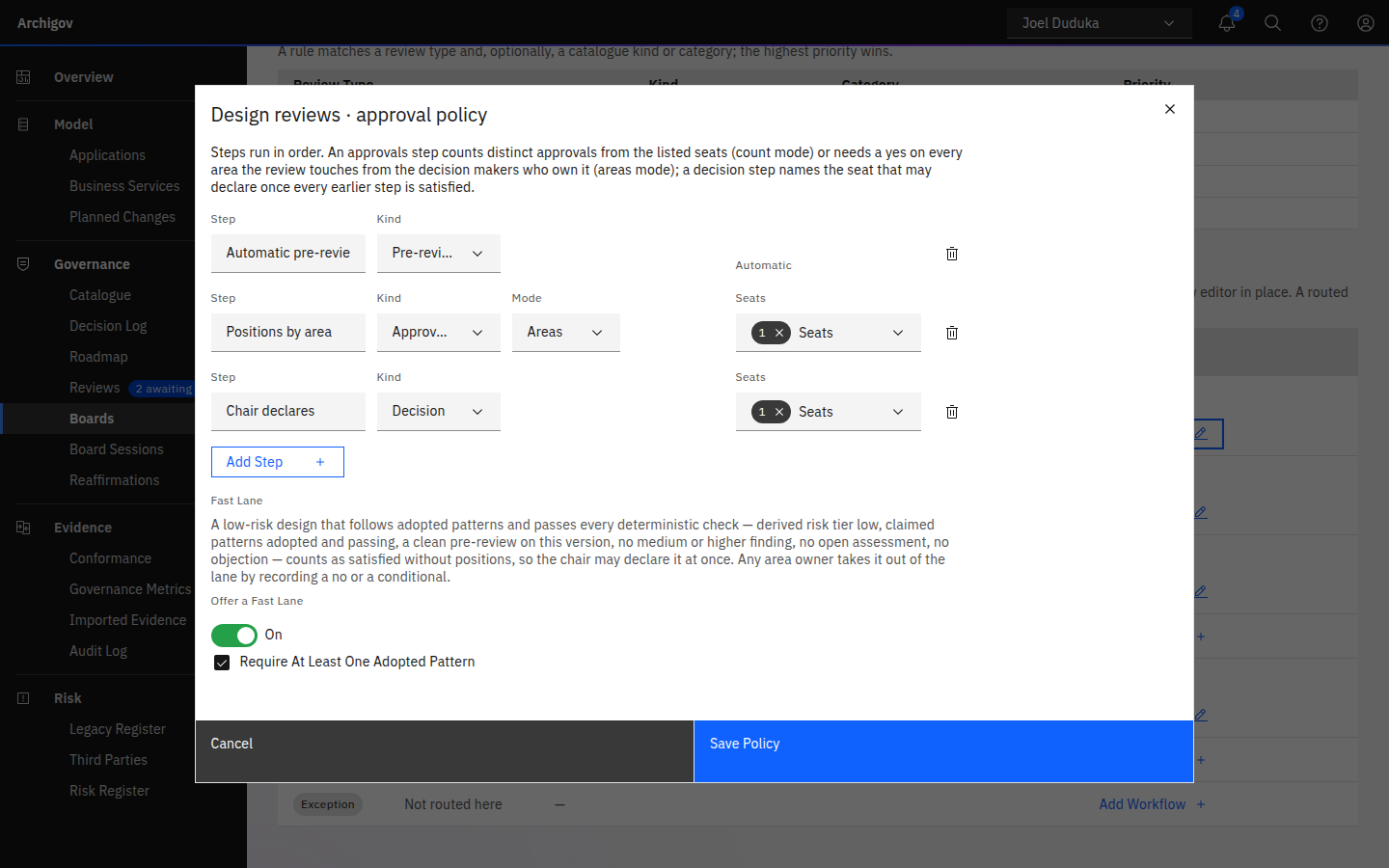
A policy is a sequence of steps for one review type on one board:
- Pre-review — the automatic checks for that type.
- Approvals — in one of two modes:
- Count mode: at least N distinct
yespositions from the listed seats. The PCB uses two approvals from its chair or decision makers. - Areas mode: one
yes(or a resolved conditional) for every touched area, from a decision maker who owns that area or their delegate. The DA in the demo tenant runs in areas mode.
- Count mode: at least N distinct
- Decision — the chair declares the outcome.
A board with no areas runs every policy in count mode. A review type with no policy of its own on its board uses the default: pre-review, one approval from a decision maker or the chair, then the chair's decision. A design policy can also offer a fast lane for low-risk designs that follow adopted patterns.
#Areas of Responsibility
In areas mode the board defines areas — seeded as Security, Data, Integration, Infrastructure, Resilience & operations, Cost, Privacy & compliance, AI — and each decision maker owns some of them. A review's touched areas are derived:
| Review type | Derived from |
|---|---|
| Design | Categories of artefacts cited by the pre-review; non-empty design sections (## Data, ## Security, ## Resilience); the application's resource types (SQL and Storage → Data, networking → Integration, compute → Infrastructure, Cognitive Services → AI, Key Vault → Security) |
| Decision | Its topic, and the categories of its linked artefacts |
| Standard, principle, pattern, policy | The artefact's category |
| Exception | The category of the rule's artefact |
If nothing maps, the board's first area is used, so every item has at least one gate. The submitter (or the board's chair or secretary) can edit the areas. A human edit is shown as such and is not overwritten by later derivation.
#Positions
Decision makers record their own positions. Nobody records on anyone else's behalf — not the chair, not the secretary. A delegate records as themselves, on behalf of the seat.
| Position | Effect |
|---|---|
| Yes | The area is satisfied |
| No | Sends the review back: stage changes_requested. A comment is required |
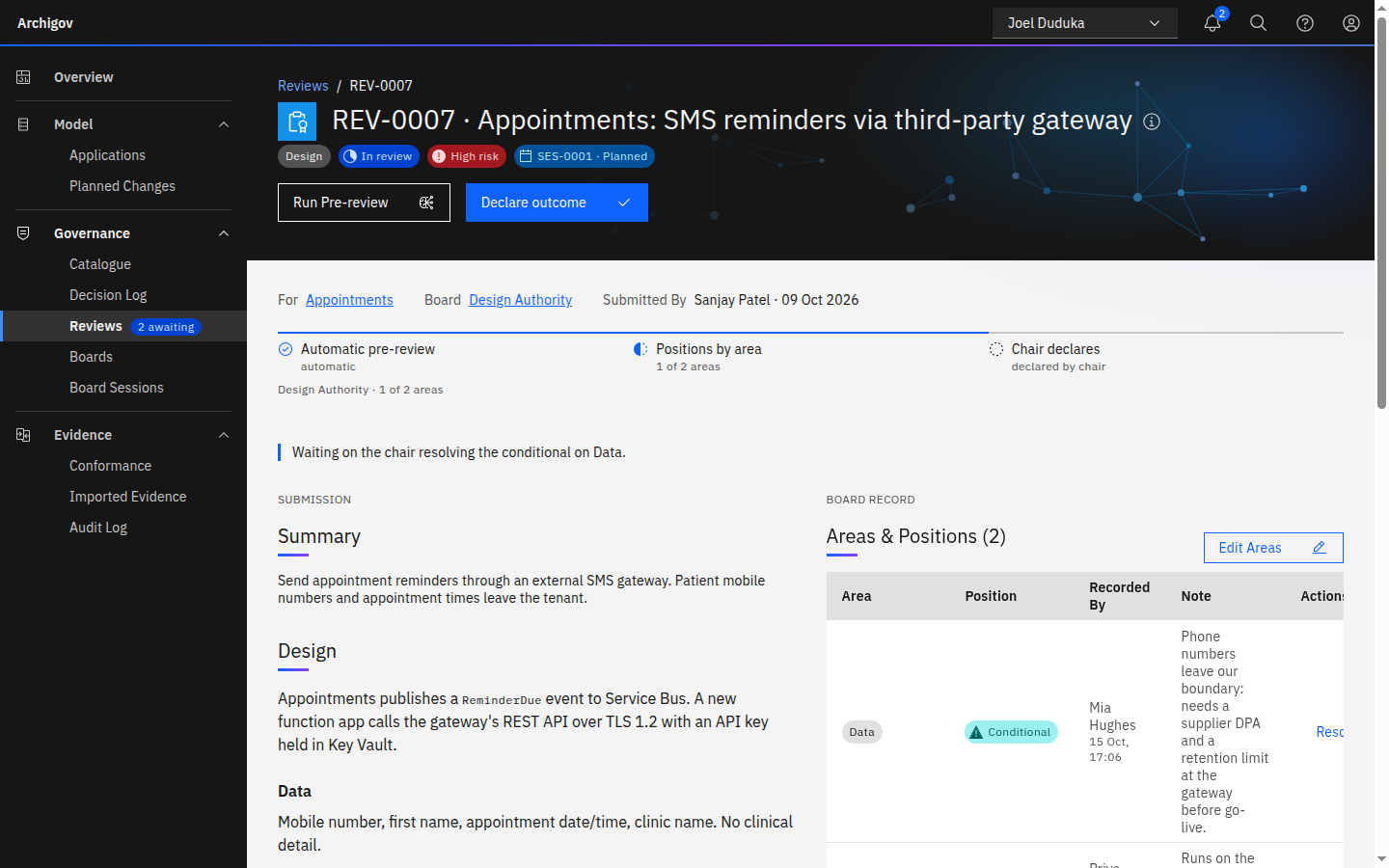
| Conditional | Yes, subject to a condition. Keeps the item open until the chair resolves it. A comment is required |
| Not my area | The area was derived wrongly and drops out. A reason is required |
Recording again supersedes your earlier position on that area. The author of a review never records a position on it, whatever seats they hold.
#Resolving a Conditional
A conditional is never overwritten. The chair adds a resolution with a mandatory explanation of at least ten characters:
- Accept as tracked condition — becomes a condition with an area, owner (the submitter by default) and due date. Conditions appear in their owner's work queue and on the Roadmap by due date, and turn overdue.
- Addressed — the concern was dealt with; the explanation says how.
- Dependent decision — the item will depend on another decision, existing or created on the spot.
The decision maker keeps the right to change their position to no until the session closes.
#Declaring an Outcome
The chair (or an acting chair nominated for one item) declares what the positions allow:
| Outcome | When it is available |
|---|---|
| Approved | Every touched area is satisfied (or the design is in the fast lane), no conditional is open, no assessment is outstanding |
| Approved with conditions | The same, with tracked conditions |
| Approved subject to circulation | In an open session, every area whose owner is present is satisfied, and an area whose owner is absent remains — it finishes by circulation before a due date |
| Changes requested | Any time the item is open; rationale required |
| Deferred | Rationale required; the item returns to the next agenda and its deferral count grows |
| Referred | To another board; rationale required |
| Rejected | Rationale required |
| Withdrawn | By the submitter only |
A submitter who also chairs the board can never decide their own item; in a session the chair nominates an acting chair for it.
Approving outcomes take effect immediately — the decision is accepted, the artefact adopted, the exception created and conformance re-evaluated — unless the item is waiting on something.
#Fast Lane
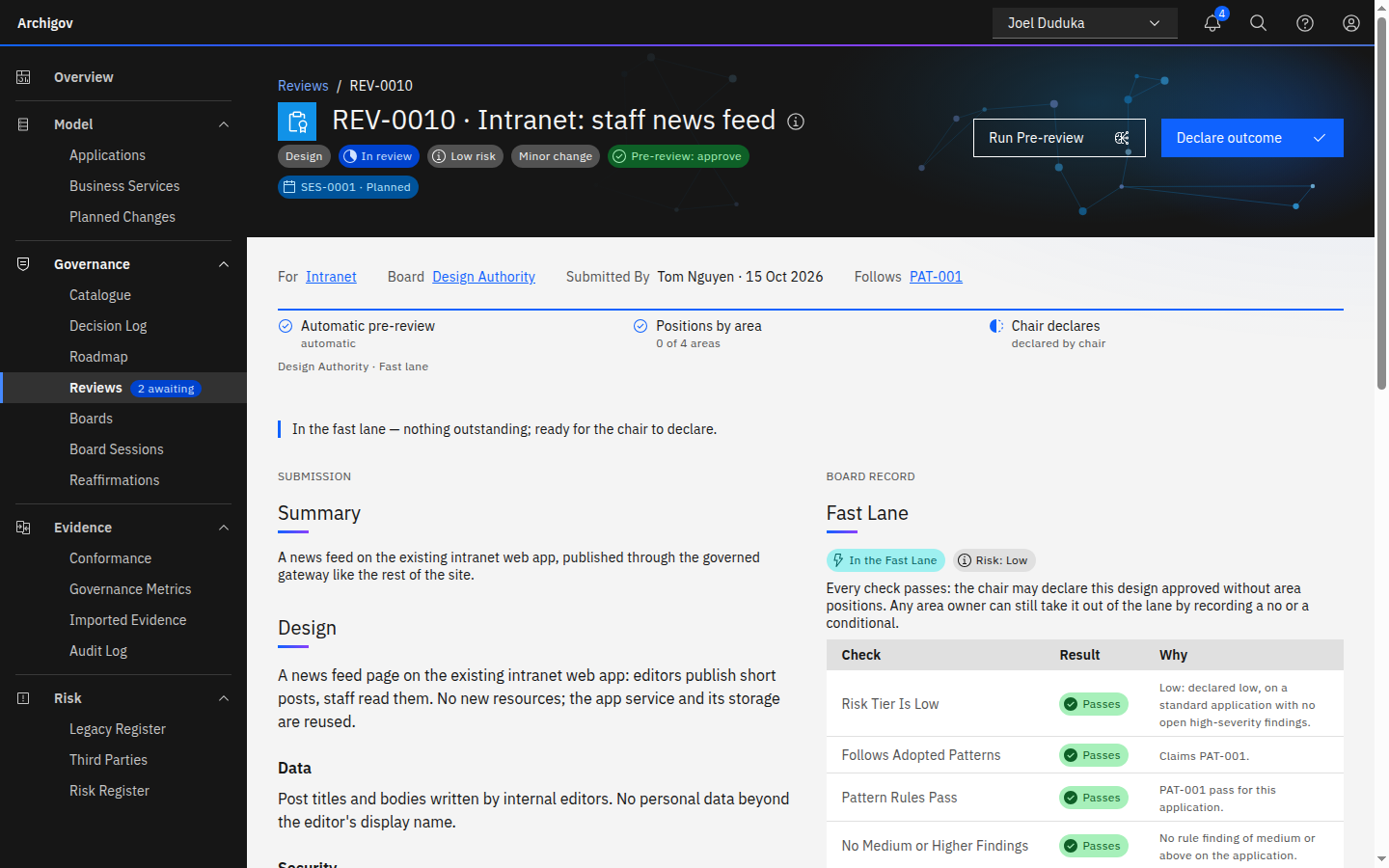
Boards spend much of their time on designs that follow a pattern they have already adopted. The fast lane applies the standard-change idea from service management, held to deterministic checks. A board can let a design review that is low risk, follows adopted patterns and passes every check count as satisfied without area positions, so the chair may declare it approved straight away. The lane never approves anything by itself: the chair still declares. Any area owner can take an item out of the lane by recording a no or a conditional, and the board's full policy then applies.
#Risk Tier and Checks
The risk tier is derived: the highest of the tier the submitter declared (medium if none), the application's criticality (critical → high; important or unclassified → medium; standard → low), and open high or critical findings on the application, which raise it to at least medium. The submitter can raise the tier, never lower it.
An item is in the lane only while all eight checks pass. The review's Fast Lane section lists each one with Passes or Fails and the reason:
| Check | Passes when |
|---|---|
| Risk Tier Is Low | The derived tier is low |
| Follows Adopted Patterns | Every pattern the design claims is adopted, and at least one is claimed if the board requires it |
| Pattern Rules Pass | No claimed pattern's rule fails for the application; application-wide exceptions are honoured |
| No Medium or Higher Findings | A live dry run of the adopted rules finds nothing of medium severity or above on the application |
| Pre-review Clean | The latest pre-review ran on this version, after any resubmission, and raised nothing of medium or above |
| No Open Assessment | No assessment the board requested is still open |
| No Objection | Nobody has a live no or an unresolved conditional on the review |
| Review Is Open | The review is still open for a decision |
A claimed pattern with no rule cannot be checked. Reviewers judge that claim, and an owner who disagrees records a no.
#Declaring Fast-Lane Items
Nobody is waited on for a position. Areas without one read Not required, and the waiting-on line reads In the fast lane — nothing outstanding. The item is ready, so it appears in the chair's declare queue (My Work and the header bell) and on the consent agenda when a session opens. On the Reviews list and the board's Reviews in Flight it carries a Fast Lane tag. On the board page, Declare Fast Lane (n) lets the chair approve every item in the lane at once, with an optional rationale. Each item is checked again as it is declared, and one that has left the lane, or that the chair may not decide, is skipped with the reason.
An approval that rested on the lane records the fact. Its timeline event carries the risk tier, the patterns and every check, and its decide:approved audit row carries basis: fast_lane. Both are in the audit chain and the evidence pack like any other approval.
#Offering the Lane and Claiming Patterns
The lane applies to design reviews only, one board at a time. The board's chair or the platform admin opens Edit Workflow on the design row and turns on Offer a Fast Lane. Require At Least One Adopted Pattern is ticked by default and decides whether a design must claim a pattern to qualify. The demo Design Authority offers the lane with a pattern required, and its Intranet: staff news feed review sits in it.
The submitter states which adopted patterns the design follows. They choose them under Follows Adopted Patterns when they Submit for Review, and the helper text says when the routed board offers a lane. While the review is open or sent back they can change the choice with Edit Patterns in its Fast Lane section. Only the submitter changes the claim. Every change is audited and appears on the timeline.
#Heuristics and AI
Everything that decides eligibility is deterministic and worked out each time the review is read; only the submitter's pattern claim is stored. AI can only make the lane harder to enter. An AI pre-review counts as the latest pre-review like any other, so one AI finding of medium or above keeps the item out of the lane. The deterministic checks run regardless, so a model that misses a finding cannot put an item in the lane, and nothing a model says puts it there. The fast lane adds no AI feature.
#Dependent Decisions
When an outcome is approved while the item has undecided dependencies, it is stored as approved pending dependencies. When the last dependency is accepted, the item becomes effective automatically (became_effective on the timeline). If a dependency is rejected, the item returns to in review and goes on the next agenda.
#Stages
submitted → pre_review → in_review ⇄ changes_requested
                              ↓
   approved · approved_with_conditions · approved_pending_dependencies
approved_subject_to_circulation · rejected · withdrawn#Pre-review
Each type has an automatic pre-review: deterministic checks (rules engine) for every type, and optionally an AI pre-review. Pre-review findings cite artefacts, decisions, resources or design sections; citations that do not resolve are discarded. Pre-reviews are advisory: origin is rules or ai, verification is unverified, and a pre-review never approves.
#The Work Queue
/me/work — the Overview's first panel and the header bell — lists what the workflow waits on you for: positions, items ready to declare, conditionals to resolve, sessions, conditions you own, circulations due, assessments assigned to you, items sent back to you, epics without a decision, and — for a chair — reaffirmations due soon or overdue on the board, each linked to the record itself. It is derived from the same checks the server enforces, so it never offers an action the server would refuse.
Something unclear or out of date? Write to hello@archigov.com or open an issue on GitHub.