- Docs
- Concepts
The Derived Model
How Archigov builds the as-is architecture from sources instead of drawings — application inference, shared services, provenance, verification and generated views.
#Why Derive
A governance tool that needs its model drawn by hand is out of date the day it is finished, and its rules cannot be trusted. Archigov collects the model from sources, so decisions and rules are checked against what actually runs — and an instance is useful within minutes of being connected.
#Sources
| Source | What it contributes |
|---|---|
| Azure Resource Graph | Resources across your subscriptions: type, location, resource group, tags, normalised properties, dependencies |
| Demo estate | A fixture estate for evaluation and training |
| CSV | Resources and relations from any inventory you can export |
| ArchiMate Open Exchange | Elements and relations from an existing repository; motivation elements become catalogue drafts |
| Defender for Cloud, Azure Policy | Not model elements: evidence attached to resources (see Evidence and audit) |
| Azure DevOps | Not model elements: planned changes (see Azure DevOps) |
Importers are sources with provenance, not editors. Collection reads metadata only.
#Applications Are Inferred
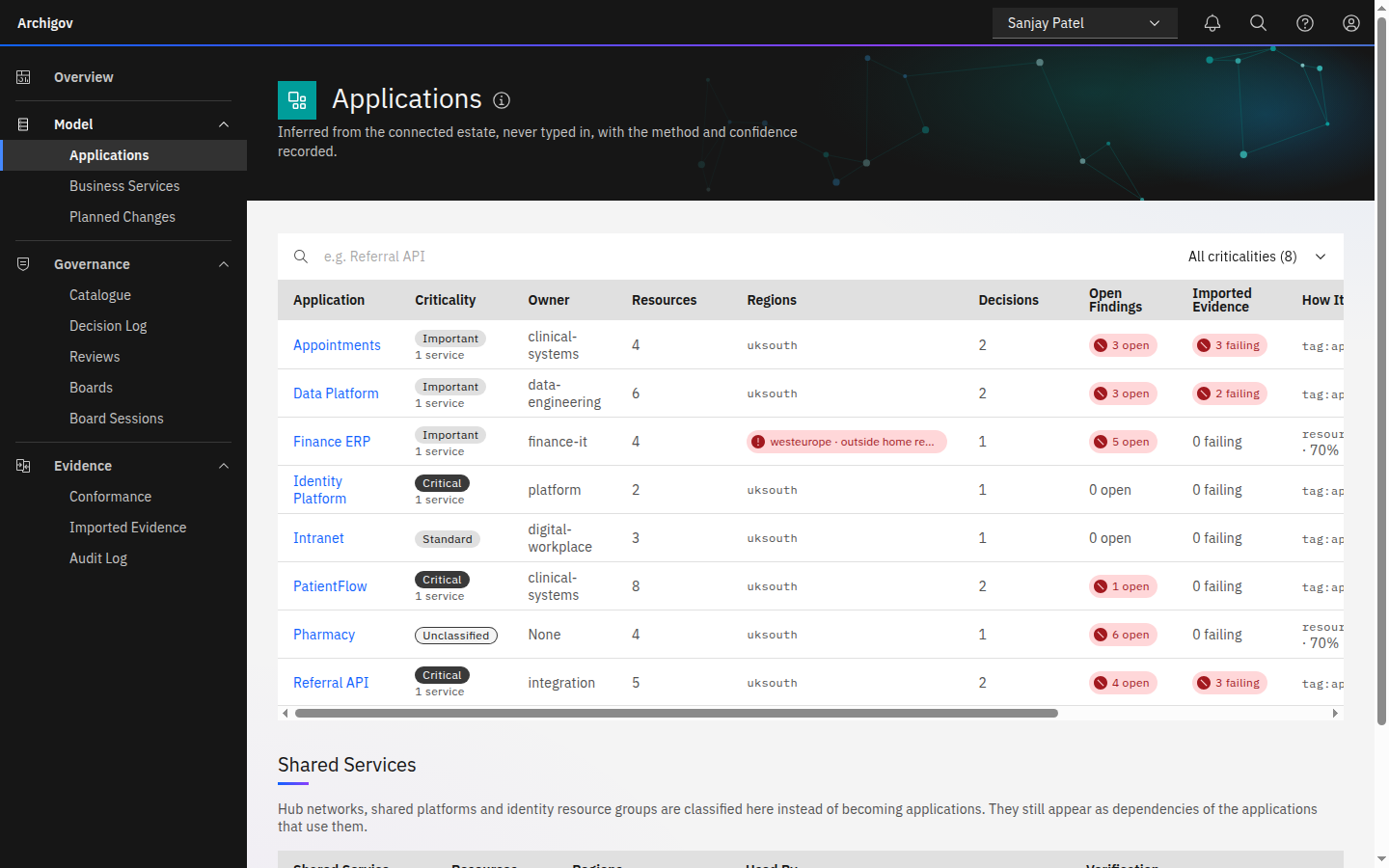
Each resource is assigned to an application, or to a shared service, by deterministic rules, in order:
- Tags — the first of
app,application,service,workloadorsystem(confidence 0.92). - Shared-platform resource groups — a resource group whose name contains
hub,network,connectivity,shared,platform,management,identityordnsbecomes a shared service, so hub networks and identity platforms never appear as workloads (0.75). - Resource-group conventions —
rg-<app>-<env>-<region>(0.70). - The resource group name itself (0.55).
Each inferred link records its method and confidence. A human can move a resource to another application; that link is then human-owned and survives later collections.
#Provenance and Verification
Every element and relation records:
- origin —
derived(read from a source),inferred(grouped by a rule),human,aiorrules; - provenance — which source, which reference, which method;
- verification —
verifiedorunverified, with who verified it and when.
A content hash is kept for each element. When a collection changes an element's content, its verification drops back to unverified automatically: whoever verified it stood behind the earlier facts. Applications can be verified in one step (Verify All), which verifies the application and its current members.
#Normalised Properties
Resource properties differ by type and API version. Rules read a small set of normalised properties so they do not need to know each schema:
| Path | Meaning |
|---|---|
props.publicAccess | Whether the resource accepts public network access |
props.minTlsVersion | Minimum TLS version accepted |
props.httpsOnly | Whether HTTP is redirected to HTTPS |
props.osSku | Operating system SKU or version |
props.location | Azure region |
tags.owner | The owner tag |
#Home Regions
The Applications page flags resources deployed outside the instance's home regions (default uksouth, ukwest, global; change them under Settings → General, or set an empty list to flag nothing). The flag is an advisory hint only — region findings come only from adopted catalogue rules.
#Generated Views
Each application's Design tab shows views generated from the model in ArchiMate notation:
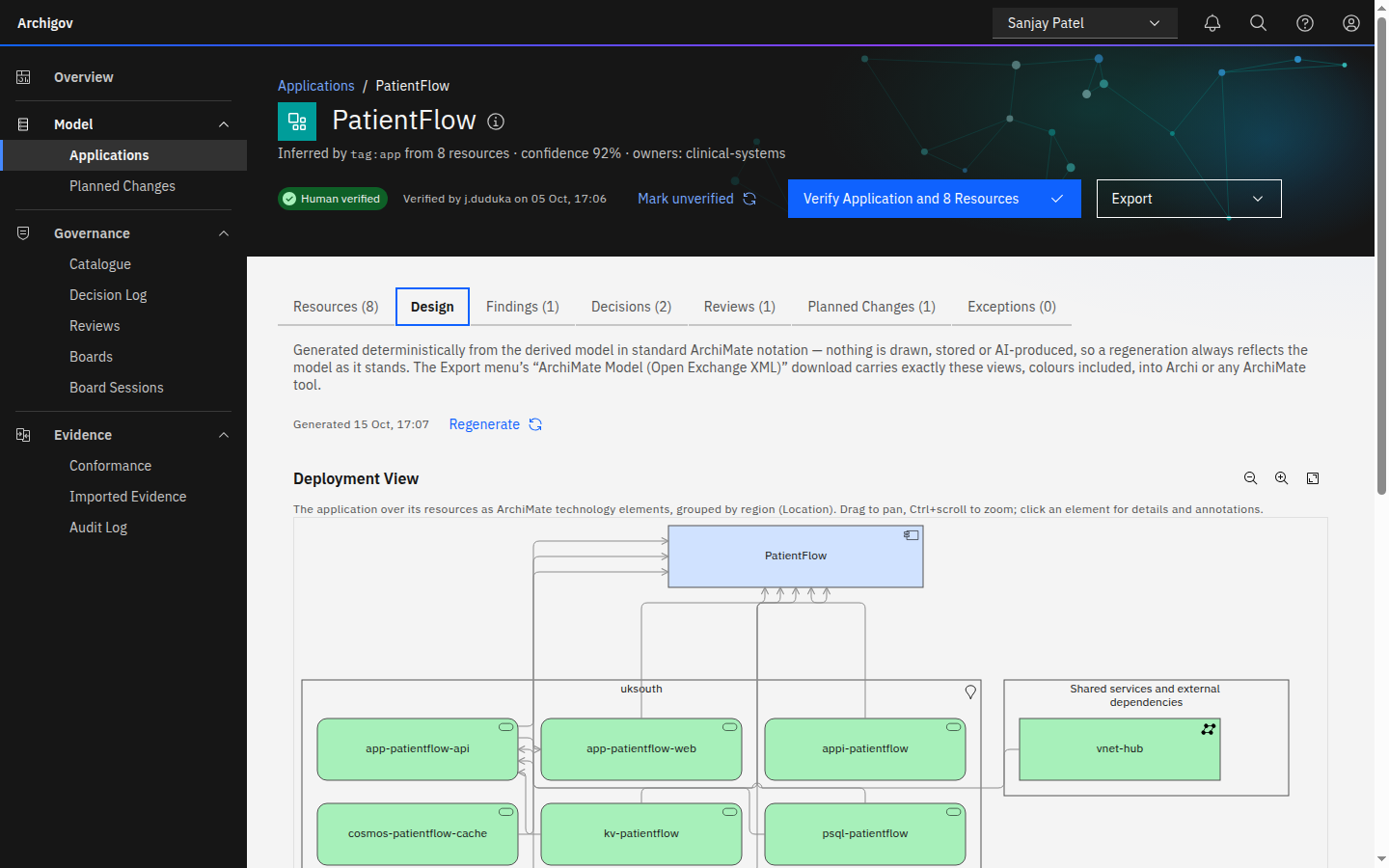
- a deployment view — resources as technology elements grouped by region, with external dependencies in a group;
- an application usage view — which applications use which providers, from literal references between resources.
Views are deterministic: fixed packing rules, orthogonally routed connections, no layout engine and no AI. They cover the physical and technology layer only, because only that layer derives deterministically; the one logical element is the inferred application component itself. The same views export as ArchiMate Open Exchange XML that opens in Archi. Authors and acting board seats can annotate a view or one of its elements.
#Planned Change
The backlog feed adds what is about to change: epics and features from Azure DevOps, or changes logged by hand. They are linked to applications and reviews, and they surface where a decision is missing or a requirement moved after its design was approved.
Something unclear or out of date? Write to hello@archigov.com or open an issue on GitHub.